一键脚本
bash <(curl -sL gitee.com/meimolihan/cmdbox/raw/master/sh/smb_mount.sh)
bash <(curl -sL ../sh/smb_mount.sh)
效果预览
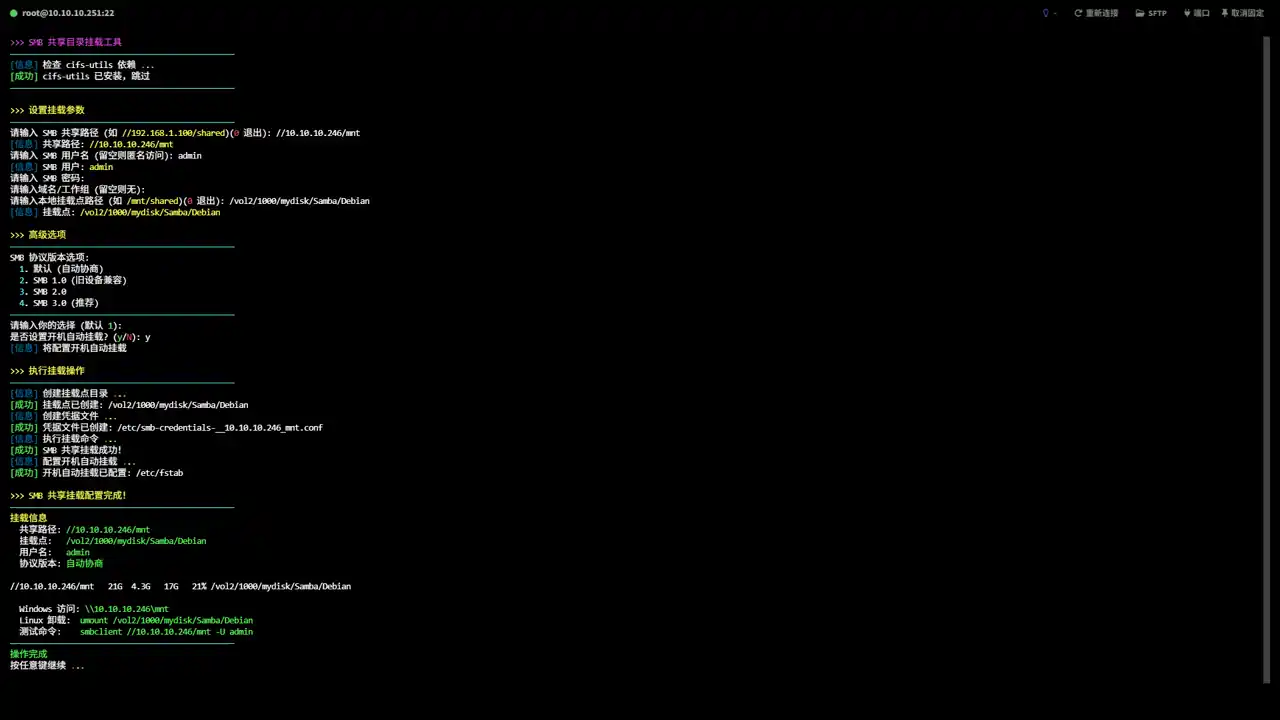
补充说明
该脚本用于在 Linux 系统上交互式挂载 SMB/CIFS 共享目录,通过逐项提示完成依赖安装、参数设置、凭据配置和挂载操作,支持开机自动挂载和多种故障降级方案。
功能特点
- root 权限自动检测(root_use 函数),非 root 用户提示后返回
- 自动检测并安装 cifs-utils 软件包(支持 apt/yum/dnf/pacman/zypper/apk)
- 交互式输入 SMB 共享路径(格式校验 //server/share,支持退出号 0)
- 支持用户名/密码认证挂载和匿名挂载(guest 模式)
- 密码为空时警告仍继续尝试挂载(不强制要求密码)
- 支持指定工作组/域名(domain 参数,跨域场景适用)
- 交互式输入本地挂载点(以 / 开头,支持路径不存在时自动 mkdir -p)
- SMB 协议版本选择:自动协商 / SMB 1.0 / 2.0 / 3.0(vers 参数)
- 可选配置 /etc/fstab 实现开机自动挂载(检测重复条目避免重复写入)
- 凭据文件自动创建并设置 600 权限(路径根据共享名自动生成,含 domain)
- 挂载失败自动降级重试(去除 file_mode/dir_mode 等参数)
- 挂载失败时列出常见排查建议(地址/服务/防火墙/凭据/协议版本)
- 挂载成功后显示完整访问信息(共享路径、挂载点、用户名、协议版本、df 磁盘信息)
- 凭据文件在挂载失败时自动清理(rm -f)
- 提供 Windows 访问地址格式转换、卸载命令和 smbclient 测试命令
输出说明
脚本输出包含以下字段:
| 字段 | 说明 |
|---|---|
| cifs-utils 检查 | 检查并安装 cifs-utils 软件包 |
| 共享路径 | 显示用户输入的 SMB 共享地址 |
| 挂载点 | 显示用户输入的本地挂载点路径 |
| 凭据文件 | 显示认证凭据文件路径和权限设置结果 |
| 高级选项 | 协议版本选择和开机自动挂载设置确认 |
| 挂载状态 | 显示挂载执行结果(成功/失败/降级成功) |
| fstab 配置 | 显示 /etc/fstab 开机自动挂载配置结果 |
| 挂载信息 | 显示共享路径、挂载点、用户名、协议版本、磁盘用量 |
| 访问命令 | 显示 Windows 访问地址、Linux 卸载命令、smbclient 测试命令 |
注意事项
- 脚本需要 root 权限来安装软件包、创建挂载点和修改 /etc/fstab
- SMB 共享路径格式必须为 //server/share,以 // 开头
- 挂载点路径必须以 / 开头,目录不存在时自动创建(mkdir -p)
- 如果目录已存在但不是目录类型(如文件),脚本会报错并退出
- 匿名访问时使用 guest 模式,无需输入用户名和密码
- 凭据文件创建在 /etc/smb-credentials-xxx.conf,权限设置为 600 确保安全
- 挂载失败时脚本自动去除 file_mode/dir_mode 参数降级重试
- 常见挂载失败原因:防火墙未放行 SMB 端口(139/445)、协议版本不匹配、凭据错误
- fstab 条目写入前检测是否已存在相同共享路径的条目,避免重复
- SMB 协议版本选择:1.0(旧设备)、2.0(Windows 7+)、3.0(Windows 10+/推荐)
- 跨域环境需在参数中指定 domain 字段
脚本源码
#!/bin/bash
set -uo pipefail

list_color_init() {
    export gl_hui=$'\033[38;5;59m'
    export gl_hong=$'\033[38;5;9m'
    export gl_lv=$'\033[38;5;10m'
    export gl_huang=$'\033[38;5;11m'
    export gl_lan=$'\033[38;5;32m'
    export gl_bai=$'\033[38;5;15m'
    export gl_zi=$'\033[38;5;13m'
    export gl_bufan=$'\033[38;5;14m'
    export gl_cheng=$'\033[38;5;208m'
    export reset=$'\033[0m'
}
list_color_init

log_info()  { echo -e "${gl_lan}[信息]${gl_bai} $*"; }
log_ok()    { echo -e "${gl_lv}[成功]${gl_bai} $*"; }
log_warn()  { echo -e "${gl_huang}[警告]${gl_bai} $*"; }
log_error() { echo -e "${gl_hong}[错误]${gl_bai} $*" >&2; }

break_end() {
    echo -e "${gl_lv}操作完成${gl_bai}"
    echo -e "${gl_bai}按任意键继续 ${gl_hong}.${gl_huang}.${gl_lv}.${gl_bai}\c"
    read -r -n 1 -s -r -p ""
    echo ""
    clear
}

sleep_fractional() {
    local seconds=$1
    if sleep "$seconds" 2>/dev/null; then return 0; fi
    if command -v perl >/dev/null 2>&1; then perl -e "select(undef, undef, undef, $seconds)"; return 0; fi
    if command -v python3 >/dev/null 2>&1; then python3 -c "import time; time.sleep($seconds)"; return 0; fi
    if command -v python >/dev/null 2>&1; then python -c "import time; time.sleep($seconds)"; return 0; fi
    local int_seconds=$(echo "$seconds" | awk '{print int($1+0.999)}')
    sleep "$int_seconds"
}

cancel_return() {
    local menu_name="${1:-上一级选单}"
    local frames=("⠋" "⠙" "⠹" "⠸" "⠼" "⠴" "⠦" "⠧" "⠇" "⠏")
    local dots=(
        "${gl_hong}."
        "${gl_huang}."
        "${gl_lv}."
        "${gl_bufan}."
        "${gl_zi}."
    )
    local dot_buffer=""
    local frame_len=${#frames[@]}
    local dot_idx=0
    local total_dots=${#dots[@]}

    for ((i=0; i<20; i++)); do
        if (( i > 0 && i % 3 == 0 && dot_idx < total_dots )); then
            dot_buffer+=${dots[$dot_idx]}
            ((dot_idx++))
        fi
        echo -ne "\r\033[K${gl_bufan}${frames[i % frame_len]}${gl_bai}即将返回 ${gl_huang}${menu_name} ${dot_buffer}"
        sleep_fractional 0.06
    done
    echo -e "\r\033[K${gl_lv}✓${gl_bai} 成功返回${gl_huang}${menu_name}${gl_bai} \n"
    clear
}

exit_animation() {
    local frames=("⠋" "⠙" "⠹" "⠸" "⠼" "⠴" "⠦" "⠧" "⠇" "⠏")
    local dots=(
        "${gl_hong}."
        "${gl_huang}."
        "${gl_lv}."
        "${gl_bufan}."
        "${gl_zi}."
    )
    local dot_buffer=""
    local frame_len=${#frames[@]}
    local dot_idx=0
    local total_dots=${#dots[@]}

    for ((i=0; i<20; i++)); do
        if (( i > 0 && i % 3 == 0 && dot_idx < total_dots )); then
            dot_buffer+=${dots[$dot_idx]}
            ((dot_idx++))
        fi
        echo -ne "\r\033[K${gl_bufan}${frames[i % frame_len]}${gl_bai} 正在退出 ${dot_buffer}"
        sleep_fractional 0.06
    done
    echo -e "\r\033[K${gl_lv}✓${gl_bai} 成功退出\n"
    clear
}

exit_script() {
    local frames=("⠋" "⠙" "⠹" "⠸" "⠼" "⠴" "⠦" "⠧" "⠇" "⠏")
    local dots=(
        "${gl_hong}."
        "${gl_huang}."
        "${gl_lv}."
        "${gl_bufan}."
        "${gl_zi}."
    )
    local dot_buffer=""
    local frame_len=${#frames[@]}
    local dot_idx=0
    local total_dots=${#dots[@]}


    for ((i=0; i<20; i++)); do
        if (( i > 0 && i % 3 == 0 && dot_idx < total_dots )); then
            dot_buffer+=${dots[$dot_idx]}
            ((dot_idx++))
        fi
        echo -ne "\r\033[K${gl_bufan}${frames[i % frame_len]}${gl_bai} 正在退出 ${dot_buffer}"
        sleep_fractional 0.06
    done
    echo -e "\r\033[K${gl_lv}✓${gl_bai} 成功退出\n"
    clear
    exit 0
}

root_use() {
    clear
    if [ "$EUID" -ne 0 ]; then
        echo -e "\n${gl_zi}>>> ROOT登录检查 ${gl_hong}.${gl_huang}.${gl_lv}.${gl_bai}"
        echo -e "${gl_bufan}————————————————————————————————————————————————${gl_bai}"
        echo -e "${gl_huang}提示: ${gl_bai}该功能需要root用户才能运行!"
        echo -e "${gl_bufan}————————————————————————————————————————————————${gl_bai}"
        break_end
        return 1
    fi
    return 0
}

mount_smb_share() {
    local server_share username mount_point password smb_ver domain
    local use_fstab cred_file

    root_use || return 1

    clear
    echo -e "${gl_zi}>>> SMB 共享目录挂载工具${gl_bai}"
    echo -e "${gl_bufan}————————————————————————————————————————————————${gl_bai}"

    log_info "检查 cifs-utils 依赖 ${gl_hong}.${gl_huang}.${gl_lv}.${gl_bai}"
    if ! command -v mount.cifs &>/dev/null; then
        log_warn "cifs-utils 未安装,正在安装... ${gl_hong}.${gl_huang}.${gl_lv}.${gl_bai}"
        if command -v apt &>/dev/null; then
            apt update && apt install -y cifs-utils
        elif command -v yum &>/dev/null; then
            yum install -y cifs-utils
        elif command -v dnf &>/dev/null; then
            dnf install -y cifs-utils
        elif command -v pacman &>/dev/null; then
            pacman -S cifs-utils --noconfirm
        elif command -v zypper &>/dev/null; then
            zypper install -y cifs-utils
        elif command -v apk &>/dev/null; then
            apk add cifs-utils
        else
            log_error "不支持的包管理器,请手动安装: apt/yum/dnf/pacman/zypper/apk install cifs-utils"
            break_end
            return 1
        fi
        if ! command -v mount.cifs &>/dev/null; then
            log_error "cifs-utils 安装失败,请手动安装后重试"
            break_end
            return 1
        fi
        log_ok "cifs-utils 安装完成"
    else
        log_ok "cifs-utils 已安装,跳过"
    fi
    echo -e "${gl_bufan}————————————————————————————————————————————————${gl_bai}"

    echo -e ""
    echo -e "${gl_huang}>>> 设置挂载参数${gl_bai}"
    echo -e "${gl_bufan}————————————————————————————————————————————————${gl_bai}"

    while true; do
        read -r -e -p "$(echo -e "${gl_bai}请输入 SMB 共享路径 (如 ${gl_huang}//192.168.1.100/shared${gl_bai})(${gl_hong}0${gl_bai} 退出): ")" server_share
        if [ "$server_share" = "0" ]; then
            cancel_return
            return 1
        fi
        if [[ -z "$server_share" ]]; then
            log_error "共享路径不能为空"
            continue
        fi
        if [[ ! "$server_share" =~ ^// ]]; then
            log_error "共享路径必须以 // 开头"
            continue
        fi
        break
    done
    log_info "共享路径: ${gl_huang}$server_share${gl_bai}"

    read -r -e -p "$(echo -e "${gl_bai}请输入 SMB 用户名 (留空则匿名访问): ")" username
    if [[ -n "$username" ]]; then
        log_info "SMB 用户: ${gl_huang}$username${gl_bai}"

        read -r -s -p "$(echo -e "${gl_bai}请输入 SMB 密码: ")" password
        echo ""
        if [[ -z "$password" ]]; then
            log_warn "密码为空,继续尝试挂载"
        fi

        read -r -e -p "$(echo -e "${gl_bai}请输入域名/工作组 (留空则无): ")" domain
    else
        log_info "使用匿名访问"
    fi

    while true; do
        read -r -e -p "$(echo -e "${gl_bai}请输入本地挂载点路径 (如 ${gl_huang}/mnt/shared${gl_bai})(${gl_hong}0${gl_bai} 退出): ")" mount_point
        if [ "$mount_point" = "0" ]; then
            cancel_return
            return 1
        fi
        if [[ -z "$mount_point" ]]; then
            log_error "挂载点路径不能为空"
            continue
        fi
        if [[ ! "$mount_point" =~ ^/ ]]; then
            log_error "挂载点路径必须以 / 开头"
            continue
        fi
        break
    done
    log_info "挂载点: ${gl_huang}$mount_point${gl_bai}"

    echo -e ""
    echo -e "${gl_huang}>>> 高级选项${gl_bai}"
    echo -e "${gl_bufan}————————————————————————————————————————————————${gl_bai}"

    echo -e "${gl_bai}SMB 协议版本选项:${gl_bai}"
    echo -e "${gl_bufan}  1${gl_bai}. 默认 (自动协商)"
    echo -e "${gl_bufan}  2${gl_bai}. SMB 1.0 (旧设备兼容)"
    echo -e "${gl_bufan}  3${gl_bai}. SMB 2.0"
    echo -e "${gl_bufan}  4${gl_bai}. SMB 3.0 (推荐)"
    echo -e "${gl_bufan}————————————————————————————————————————————————${gl_bai}"
    read -r -e -p "$(echo -e "${gl_bai}请输入你的选择 (默认 ${gl_lv}1${gl_bai}): ")" smb_ver_choice
    case "${smb_ver_choice:-1}" in
        2) smb_ver="1.0" ;;
        3) smb_ver="2.0" ;;
        4) smb_ver="3.0" ;;
        *) smb_ver="" ;;
    esac

    read -r -e -p "$(echo -e "${gl_bai}是否设置开机自动挂载? (${gl_lv}y${gl_bai}/${gl_hong}N${gl_bai}): ")" use_fstab
    if [[ "$use_fstab" =~ ^[Yy]$ ]]; then
        log_info "将配置开机自动挂载"
    fi

    echo -e ""
    echo -e "${gl_huang}>>> 执行挂载操作${gl_bai}"
    echo -e "${gl_bufan}————————————————————————————————————————————————${gl_bai}"

    log_info "创建挂载点目录 ${gl_hong}.${gl_huang}.${gl_lv}.${gl_bai}"
    mkdir -p "$mount_point" 2>/dev/null || {
        log_error "无法创建挂载点 $mount_point,请检查权限"
        break_end
        return 1
    }
    log_ok "挂载点已创建: $mount_point"

    cred_file=""
    if [[ -n "$username" ]]; then
        cred_file="/etc/smb-credentials-$(echo "$server_share" | tr '/' '_' | tr -d ':').conf"
        log_info "创建凭据文件 ${gl_hong}.${gl_huang}.${gl_lv}.${gl_bai}"
        cat > "$cred_file" <<EOF
username=$username
password=$password
EOF
        if [[ -n "$domain" ]]; then
            echo "domain=$domain" >> "$cred_file"
        fi
        chmod 600 "$cred_file"
        log_ok "凭据文件已创建: $cred_file"
    fi

    log_info "执行挂载命令 ${gl_hong}.${gl_huang}.${gl_lv}.${gl_bai}"
    local mount_opts="iocharset=utf8,file_mode=0755,dir_mode=0755,noperm"
    if [[ -n "$cred_file" ]]; then
        mount_opts="credentials=$cred_file,$mount_opts"
    else
        mount_opts="guest,$mount_opts"
    fi
    if [[ -n "$smb_ver" ]]; then
        mount_opts="$mount_opts,vers=$smb_ver"
    fi

    if mount -t cifs "$server_share" "$mount_point" -o "$mount_opts" 2>/dev/null; then
        log_ok "SMB 共享挂载成功!"
    else
        log_warn "使用标准参数挂载失败,尝试降级参数..."
        local fallback_opts="iocharset=utf8,noperm"
        if [[ -n "$cred_file" ]]; then
            fallback_opts="credentials=$cred_file,$fallback_opts"
        else
            fallback_opts="guest,$fallback_opts"
        fi
        if [[ -n "$smb_ver" ]]; then
            fallback_opts="$fallback_opts,vers=$smb_ver"
        fi
        if mount -t cifs "$server_share" "$mount_point" -o "$fallback_opts" 2>/dev/null; then
            log_ok "SMB 共享挂载成功(降级参数)"
        else
            log_error "SMB 共享挂载失败"
            log_info "请检查以下可能原因:"
            echo -e "${gl_bai}  1. SMB 服务器地址和共享名是否正确"
            echo -e "${gl_bai}  2. SMB 服务是否正在运行"
            echo -e "${gl_bai}  3. 防火墙是否放行 SMB 端口 (139/445)"
            echo -e "${gl_bai}  4. 用户名和密码是否正确"
            echo -e "${gl_bai}  5. 尝试指定不同 SMB 协议版本"
            echo -e "${gl_bufan}————————————————————————————————————————————————${gl_bai}"
            [[ -n "$cred_file" ]] && rm -f "$cred_file"
            break_end
            return 1
        fi
    fi

    if [[ "$use_fstab" =~ ^[Yy]$ ]]; then
        log_info "配置开机自动挂载 ${gl_hong}.${gl_huang}.${gl_lv}.${gl_bai}"
        local fstab_entry="$server_share $mount_point cifs $mount_opts 0 0"
        if grep -qF "$server_share" /etc/fstab 2>/dev/null; then
            log_warn "fstab 中已存在该共享条目,跳过"
        else
            echo "$fstab_entry" >> /etc/fstab
            log_ok "开机自动挂载已配置: /etc/fstab"
        fi
    fi

    echo -e ""
    echo -e "${gl_huang}>>> SMB 共享挂载配置完成!${gl_bai}"
    echo -e "${gl_bufan}————————————————————————————————————————————————${gl_bai}"
    echo -e "${gl_huang}挂载信息${gl_bai}"
    echo -e "${gl_bai}  共享路径: ${gl_lv}$server_share${gl_bai}"
    echo -e "${gl_bai}  挂载点:   ${gl_lv}$mount_point${gl_bai}"
    echo -e "${gl_bai}  用户名:   ${gl_lv}${username:-匿名}${gl_bai}"
    echo -e "${gl_bai}  协议版本: ${gl_lv}${smb_ver:-自动协商}${gl_bai}"
    echo -e ""
    df -h "$mount_point" 2>/dev/null | tail -1
    echo -e ""
    echo -e "${gl_bai}  Windows 访问: ${gl_lv}$(echo "$server_share" | sed 's|//|\\\\\\\\|; s|/|\\\\|g')${gl_bai}"
    echo -e "${gl_bai}  Linux 卸载:  ${gl_lv}umount $mount_point${gl_bai}"
    echo -e "${gl_bai}  测试命令:    ${gl_lv}smbclient $server_share -U ${username:-anonymous}${gl_bai}"
    echo -e "${gl_bufan}————————————————————————————————————————————————${gl_bai}"
    break_end
}

mount_smb_share
创建本地脚本
new_script="new_test.sh"

cat > "$new_script" << 'EOF'
#!/bin/bash

# 粘贴脚本源码

EOF

# 保留本地脚本,去掉 rm -f "$new_script"
chmod +x "$new_script" && ./"$new_script" && rm -f "$new_script"