一键脚本
bash <(curl -sL gitee.com/meimolihan/cmdbox/raw/master/sh/lx_timer_list.sh)
bash <(curl -sL ../sh/lx_timer_list.sh)
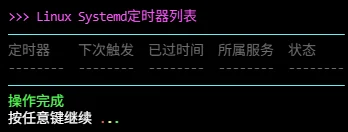
效果预览
补充说明
该脚本用于美化显示 Linux systemd 定时器列表,基于 systemctl list-timers 命令实现,适合快速查看系统所有定时任务及其触发时间的场景。
功能特点
- 彩色输出:定时器名称(青色)、触发时间(蓝色)、状态(绿色)使用不同颜色区分
- 完整信息:显示定时器名称、触发时间、过期时间、所属服务等信息
- 表格格式化:自动使用
column命令对齐输出 - 全部显示:同时显示已激活和已失效的定时器
输出说明
脚本输出包含以下字段:
| 字段 | 说明 |
|---|---|
| 定时器 | Systemd 定时器单元名称 |
| 下次触发 | 下一次计划执行时间 |
| 已过时间 | 距离上次触发的时间 |
| 所属服务 | 定时器触发的服务单元 |
| 状态 | 激活或失效状态 |
注意事项
- 需要 systemd 系统和服务管理器
- 需要
systemctl命令(通常系统已自带) - 需要
column命令(通常系统已自带) - 仅显示 systemd 定时器,不显示 cron 任务
- 使用
--all参数同时显示已失效的定时器
脚本源码
#!/bin/bash
set -uo pipefail

list_color_init() {
    export gl_hui=$'\033[38;5;59m'
    export gl_hong=$'\033[38;5;9m'
    export gl_lv=$'\033[38;5;10m'
    export gl_huang=$'\033[38;5;11m'
    export gl_lan=$'\033[38;5;32m'
    export gl_bai=$'\033[38;5;15m'
    export gl_zi=$'\033[38;5;13m'
    export gl_bufan=$'\033[38;5;14m'
    export reset=$'\033[0m'
}
list_color_init

break_end() {
    echo -e "${gl_lv}操作完成${gl_bai}"
    echo -e "${gl_bai}按任意键继续 ${gl_hong}.${gl_huang}.${gl_lv}.${gl_bai}\c"
    read -r -n 1 -s -r -p ""
    echo ""
    clear
}

column_if_available() {
    if command -v column &> /dev/null; then
        column -t -s $'\t'
    else
        cat
    fi
}

list_beautify_linux_timer() {
    {
        printf "%s%s\t%s\t%s\t%s\t%s%s\n" "$gl_hui" "定时器" "下次触发" "已过时间" "所属服务" "状态" "$reset"
        printf "%s%s\t%s\t%s\t%s\t%s%s\n" "$gl_hui" "--------" "--------" "--------" "--------" "--------" "$reset"

        data=$(systemctl list-timers --all 2>/dev/null)
        if [ -z "$data" ]; then
            printf "%s%s\t%s\t%s\t%s\t%s%s\n" "$gl_huang" "(无数据)" "(无数据)" "(无数据)" "(无数据)" "(无数据)" "$reset"
        else
            echo "$data" | tail -n +2 | grep -v "^$" | \
            grep -v "^[0-9]\+ timers listed\|^[0-9]\+ unit\|^LIST\|^$" | \
            awk -v name_color="$gl_bufan" \
                -v next_color="$gl_lv" \
                -v left_color="$gl_huang" \
                -v service_color="$gl_lan" \
                -v status_color="$gl_hui" \
                -v reset="$reset" '
            BEGIN {
                FS="[[:space:]]][[:space:]]*";
                OFS="\t"
            }
            {
                if (NF >= 5) {
                    nxt = $1
                    left = $2
                    serv = $3
                    unit = $4
                    active = $5
                } else if (NF >= 4) {
                    nxt = $1
                    left = $2
                    serv = $3
                    unit = $4
                    active = ""
                } else if (NF >= 3) {
                    nxt = $1
                    left = $2
                    serv = $3
                    unit = ""
                    active = ""
                } else {
                    next
                }

                gsub(/^[[:space:]]+/, "", nxt)
                gsub(/^[[:space:]]+/, "", left)
                gsub(/^[[:space:]]+/, "", serv)
                gsub(/^[[:space:]]+/, "", unit)
                gsub(/^[[:space:]]+/, "", active)

                gsub(/[[:space:]]+$/, "", nxt)
                gsub(/[[:space:]]+$/, "", left)
                gsub(/[[:space:]]+$/, "", serv)
                gsub(/[[:space:]]+$/, "", unit)
                gsub(/[[:space:]]+$/, "", active)

                if (nxt == "" || nxt == "-")
                    nxt = "(已过期)"

                if (active == "active") active = "激活"

                print name_color unit reset,
                      next_color nxt reset,
                      left_color left reset,
                      service_color serv reset,
                      status_color active reset
            }'
        fi
    } | column_if_available
}

list_beautify_all() {
    clear
    echo -e "${gl_zi}>>> Linux Systemd定时器列表${gl_bai}"
    echo -e "${gl_bufan}————————————————————————————————————————————————${gl_bai}"
    list_beautify_linux_timer
    echo -e "${gl_bufan}————————————————————————————————————————————————${gl_bai}"
    break_end
}

list_beautify_all
创建本地脚本
new_script="new_test.sh"

cat > "$new_script" << 'EOF'
#!/bin/bash

# 粘贴脚本源码

EOF

# 保留本地脚本,去掉 rm -f "$new_script"
chmod +x "$new_script" && ./"$new_script" && rm -f "$new_script"
相关命令
- lx_block_list
- lx_cert_list
- lx_cron_list
- lx_disk_list
- lx_env_list
- lx_firewall_list
- lx_fstab_list
- lx_gpu_list
- lx_hardware_list
- lx_inode_list
- lx_io_list
- lx_ip_list
- lx_journal_log_list
- lx_load_list
- lx_locale_list
- lx_login_log_list
- lx_ls_list
- lx_lscpu_list
- lx_lspci_list
- lx_lvm_list
- lx_modules_list
- lx_mounts_list
- lx_nic_list
- lx_package_list
- lx_port_list
- lx_process_list
- lx_raid_list
- lx_services_list
- lx_sshd_conf_list
- lx_swap_list
- lx_systemd_list
- lx_tcp_list
- lx_timer_list 👈 当前所在位置
- lx_timezone_list
- lx_uptime_list
- lx_usb_list
- lx_user_list
- lx_zombie_list