lx_setup_ssh
脚本
Linux SSH 服务安装配置与安全优化
一键脚本
bash <(curl -sL gitee.com/meimolihan/cmdbox/raw/master/sh/lx_setup_ssh.sh)
bash <(curl -sL ../sh/lx_setup_ssh.sh)
效果预览
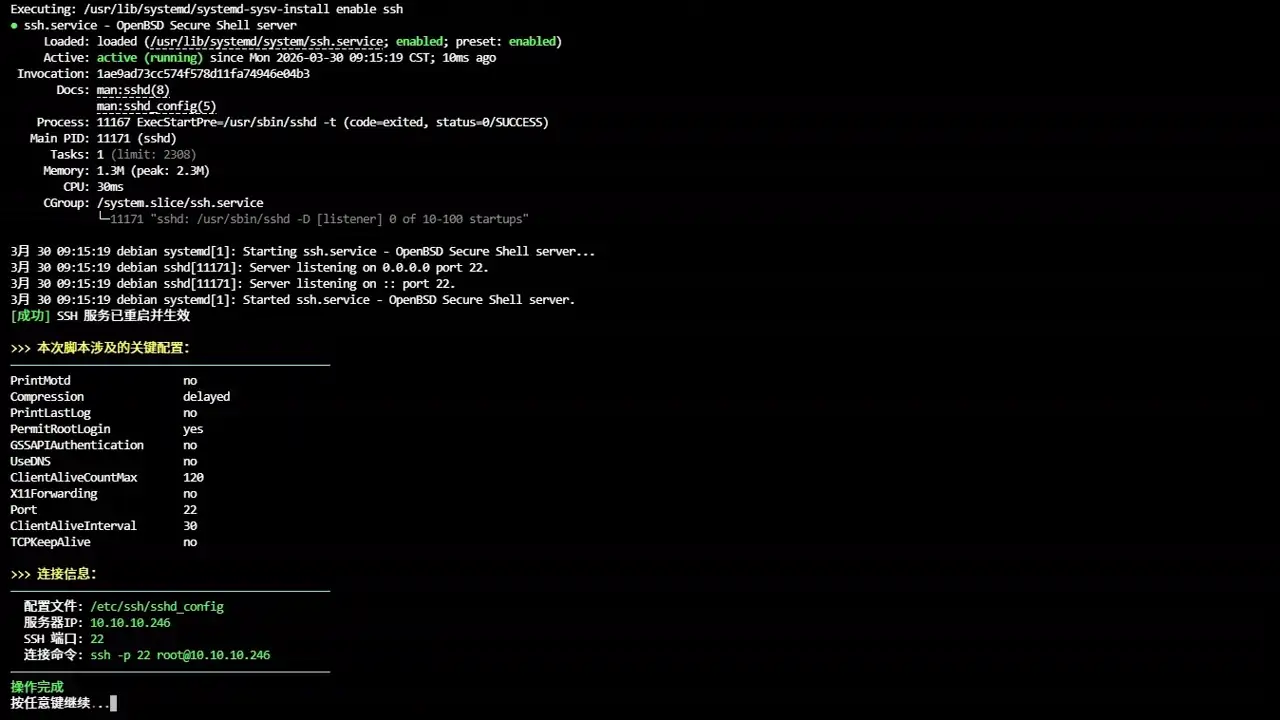
补充说明
lx_setup_ssh 是一键安装、配置并优化 SSH 服务的脚本,自动识别主流 Linux 发行版(Debian/Ubuntu/CentOS/RHEL/Fedora/Rocky/AlmaLinux/openSUSE/Arch/Manjaro)并执行对应操作。
功能概述
| 功能 |
说明 |
| 发行版检测 |
自动识别 10+ 种 Linux 发行版及版本号 |
| SSH 安装 |
使用对应包管理器安装 openssh-server |
| 配置备份 |
自动备份原配置文件(带时间戳) |
| 安全优化 |
禁用 DNS 反向解析、GSSAPI、压缩延迟等 |
| 连接保活 |
配置 ClientAliveInterval/CountMax 防止断连 |
| 防火墙配置 |
自动适配 ufw / firewalld / iptables |
| 密码修改 |
可选交互式修改 root 密码 |
| 配置查看 |
彩色显示当前 SSH 关键配置项 |
兼容发行版
| 发行版 |
包管理器 |
服务名称 |
| Debian / Ubuntu / LinuxMint |
apt |
ssh |
| CentOS / RHEL / Fedora / Rocky / AlmaLinux |
dnf/yum |
sshd |
| openSUSE / SUSE |
zypper |
ssh |
| Arch / Manjaro |
pacman |
ssh |
安全优化项
| 配置项 |
值 |
作用 |
| PermitRootLogin |
yes |
允许 root 登录 |
| GSSAPIAuthentication |
no |
禁用 GSSAPI 认证(加快连接速度) |
| UseDNS |
no |
禁用 DNS 反向解析(避免连接延迟) |
| PrintMotd |
no |
不显示每日提示信息 |
| PrintLastLog |
no |
不显示上次登录信息 |
| TCPKeepAlive |
no |
禁用 TCP 保活(依赖应用层心跳) |
| ClientAliveInterval |
30 |
服务端每 30 秒向客户端发心跳 |
| ClientAliveCountMax |
120 |
允许 120 次心跳超时(合计 60 分钟) |
| Compression |
delayed |
延迟压缩(密码阶段后启用) |
| X11Forwarding |
no |
禁用 X11 转发(减少攻击面) |
安装 SSH 服务
sudo apt-get update && sudo apt-get install openssh-server -y
sudo dnf install -y openssh-server
sudo zypper install -y openssh
sudo pacman -Syu --noconfirm openssh
启用 SSH 服务
sudo systemctl enable ssh
sudo systemctl start ssh
sudo systemctl enable sshd
sudo systemctl start sshd
sudo systemctl status ssh
sudo systemctl status sshd
配置备份与修改
sudo cp /etc/ssh/sshd_config /etc/ssh/sshd_config.backup.$(date +%Y%m%d)
sudo sed -i \
-e 's/^#Port 22/Port 22/' \
-e 's/^#PermitRootLogin.*/PermitRootLogin yes/' \
-e 's/^#GSSAPIAuthentication.*/GSSAPIAuthentication no/' \
-e 's/^#UseDNS.*/UseDNS no/' \
-e 's/^#ClientAliveInterval.*/ClientAliveInterval 30/' \
-e 's/^#ClientAliveCountMax.*/ClientAliveCountMax 120/' \
/etc/ssh/sshd_config
sudo sshd -t
sudo systemctl restart ssh
防火墙放行
sudo ufw allow 22/tcp
sudo ufw enable
sudo firewall-cmd --permanent --add-port=22/tcp
sudo firewall-cmd --reload
sudo iptables -A INPUT -p tcp --dport 22 -j ACCEPT
客户端连接
ssh root@<服务器IP>
ssh -p 22 root@<服务器IP>
hostname -I | awk '{print $1}'
安全加固建议
echo "AllowUsers admin user1 user2" >> /etc/ssh/sshd_config
echo "MaxAuthTries 3" >> /etc/ssh/sshd_config
echo "PasswordAuthentication no" >> /etc/ssh/sshd_config
echo "PubkeyAuthentication yes" >> /etc/ssh/sshd_config
ssh-keygen -t ed25519
ssh-copy-id -p 22 user@server_ip
日志与监控
sudo journalctl -u ssh -f
sudo journalctl -u sshd -f
last
sudo grep "Failed password" /var/log/auth.log
sudo grep "Failed password" /var/log/secure
sudo sshd -t
故障排查
sudo systemctl status ssh
sudo netstat -tulnp | grep :22
sudo ss -tulnp | grep :22
sudo ufw status
sudo firewall-cmd --list-all
sudo iptables -L INPUT -n | grep :22
ssh -vvv user@server_ip
脚本源码
#!/bin/bash
set -eo pipefail
gl_hui='\033[38;5;59m'
gl_hong='\033[38;5;9m'
gl_lv='\033[38;5;10m'
gl_huang='\033[38;5;11m'
gl_lan='\033[38;5;32m'
gl_bai='\033[38;5;15m'
gl_zi='\033[38;5;13m'
gl_bufan='\033[38;5;14m'
log_info() { echo -e "${gl_lan}[信息]${gl_bai} $*"; }
log_ok() { echo -e "${gl_lv}[成功]${gl_bai} $*"; }
log_warn() { echo -e "${gl_huang}[警告]${gl_bai} $*"; }
log_error() { echo -e "${gl_hong}[错误]${gl_bai} $*" >&2; }
break_end() {
echo -e "${gl_lv}操作完成${gl_bai}"
echo -e "${gl_bai}按任意键继续 ${gl_hong}.${gl_huang}.${gl_lv}.${gl_bai}\c"
read -r -n 1 -s -p ""
echo ""
clear
}
column_if_available() {
if command -v column &> /dev/null; then
column -t -s $'\t'
else
cat
fi
}
sleep_fractional() {
local seconds=$1
if sleep "$seconds" 2>/dev/null; then return 0; fi
if command -v perl >/dev/null 2>&1; then perl -e "select(undef, undef, undef, $seconds)"; return 0; fi
if command -v python3 >/dev/null 2>&1; then python3 -c "import time; time.sleep($seconds)"; return 0; fi
if command -v python >/dev/null 2>&1; then python -c "import time; time.sleep($seconds)"; return 0; fi
local int_seconds=$(echo "$seconds" | awk '{print int($1+0.999)}')
sleep "$int_seconds"
}
cancel_return() {
local menu_name="${1:-上一级选单}"
echo -ne "${gl_lv}即将 ${gl_huang}${menu_name} ${gl_hong}.${gl_huang}.${gl_lv}.${gl_bai}\c"
sleep_fractional 0.5
echo -ne "${gl_hong}.${gl_huang}.${gl_lv}.${gl_bai}\c"
sleep_fractional 0.6
echo ""
clear
}
root_use() {
clear
if [ "$EUID" -ne 0 ]; then
echo -e "\n${gl_zi}>>> ROOT登录检查 ${gl_hong}.${gl_huang}.${gl_lv}.${gl_bai}"
echo -e "${gl_bufan}————————————————————————————————————————————————${gl_bai}"
echo -e "${gl_huang}提示: ${gl_bai}该功能需要root用户才能运行!"
echo -e "${gl_bufan}————————————————————————————————————————————————${gl_bai}"
break_end
mobufan
return 1
fi
return 0
}
list_beautify_sshd_config() {
{
grep -vE '^#|^$' /etc/ssh/sshd_config | awk -v gray="$gl_hui" -v green="$gl_lv" \
-v yellow="$gl_huang" -v blue="$gl_lan" -v purple="$gl_zi" -v reset="$reset" '
BEGIN {
info["Port"] = "SSH服务端口"
info["ListenAddress"] = "监听IP地址"
info["Protocol"] = "SSH协议版本"
info["HostKey"] = "主机密钥文件路径"
info["PermitRootLogin"] = "是否允许root登录"
info["PasswordAuthentication"] = "是否开启密码认证"
info["PubkeyAuthentication"] = "是否开启公钥认证"
info["AuthorizedKeysFile"] = "公钥授权文件位置"
info["Subsystem"] = "系统子服务(一般为SFTP)"
info["UsePAM"] = "是否启用PAM认证"
info["X11Forwarding"] = "是否开启图形界面转发"
info["PrintMotd"] = "登录是否显示提示信息"
info["ClientAliveInterval"] = "客户端心跳检测间隔(秒)"
info["ClientAliveCountMax"] = "客户端最大心跳超时次数"
info["AllowUsers"] = "允许登录的用户列表"
info["DenyUsers"] = "禁止登录的用户列表"
info["AllowGroups"] = "允许登录的用户组"
info["DenyGroups"] = "禁止登录的用户组"
info["ChallengeResponseAuthentication"] = "挑战响应式认证"
info["GSSAPIAuthentication"] = "GSSAPI统一认证"
info["KerberosAuthentication"] = "Kerberos票据认证"
info["LogLevel"] = "日志记录级别"
info["MaxAuthTries"] = "最大密码错误次数"
info["MaxSessions"] = "最大同时连接会话数"
info["TCPKeepAlive"] = "是否开启TCP连接保活"
info["PermitEmptyPasswords"] = "是否允许空密码登录"
info["StrictModes"] = "是否开启权限严格检查"
info["AcceptEnv"] = "允许接收的客户端环境变量"
info["Ciphers"] = "SSH加密算法套件"
info["MACs"] = "消息校验算法"
info["KexAlgorithms"] = "密钥交换算法"
info["Match"] = "条件匹配规则配置"
print gray "配置项名称\t参数值\t中文说明" reset
print gray "----------\t--------\t-------------------------" reset
}
{
key = $1
val = substr($0, index($0, $2))
gsub(/^[ \t]+|[ \t]+$/, "", val)
if (key == "Port" || key == "ListenAddress") color = purple
else color = green
desc = (key in info) ? info[key] : "其他SSH配置项"
print color key "\t" yellow val "\t" blue desc reset
}' | column_if_available
}
}
lx_setup_ssh() {
clear
root_use
echo -e "${gl_zi}>>> 配置 SSH 服务${gl_bai}"
echo -e "${gl_bufan}————————————————————————————————————————————————${gl_bai}"
list_beautify_sshd_config
echo -e "${gl_bufan}————————————————————————————————————————————————${gl_bai}"
echo ""
echo -e "${gl_huang}>>> 配置 SSH 端口${gl_bai}"
echo -e "${gl_bufan}————————————————————————————————————————————————${gl_bai}"
local port_input
while true; do
read -r -e -p "$(echo -e "${gl_bai}请输入 SSH 端口 (回车默认 ${gl_huang}22${gl_bai}, ${gl_huang}0${gl_bai}退出脚本): ")" port_input
[ -z "$port_input" ] && { SSH_PORT=22; break; }
[ "$port_input" = "0" ] && { cancel_return "退出脚本"; return 1; }
if [[ "$port_input" =~ ^[1-9][0-9]{0,4}$ ]] && (( port_input <= 65535 )); then
SSH_PORT=$port_input
break
else
log_error "端口格式非法,请重新输入!"
fi
done
log_info "使用 SSH 端口: $SSH_PORT"
log_info "检测操作系统 ${gl_hong}.${gl_huang}.${gl_lv}.${gl_bai}"
if [ -f /etc/os-release ]; then
. /etc/os-release
OS=$ID
OS_VERSION=$VERSION_ID
OS_NAME=$PRETTY_NAME
elif type lsb_release >/dev/null 2>&1; then
OS=$(lsb_release -si | tr '[:upper:]' '[:lower:]')
OS_VERSION=$(lsb_release -sr)
OS_NAME=$(lsb_release -sd)
elif [ -f /etc/lsb-release ]; then
. /etc/lsb-release
OS=$DISTRIB_ID
OS_VERSION=$DISTRIB_RELEASE
OS_NAME=$DISTRIB_DESCRIPTION
elif [ -f /etc/debian_version ]; then
OS=debian
OS_VERSION=$(cat /etc/debian_version)
OS_NAME="Debian $OS_VERSION"
elif [ -f /etc/redhat-release ]; then
OS=$(awk '{print tolower($1)}' /etc/redhat-release)
OS_VERSION=$(awk '{print $3}' /etc/redhat-release)
OS_NAME=$(cat /etc/redhat-release)
else
log_error "无法检测操作系统"; exit 1
fi
log_info "检测到操作系统: $OS_NAME"
log_info "开始安装 SSH 服务 ${gl_hong}.${gl_huang}.${gl_lv}.${gl_bai}"
case $OS in
debian|ubuntu|linuxmint)
apt-get update -qq
apt-get install -y openssh-server
;;
centos|rhel|fedora|rocky|almalinux)
if command -v dnf >/dev/null 2>&1; then
dnf install -y openssh-server
else
yum install -y openssh-server
fi
;;
opensuse*|suse*)
zypper install -y openssh
;;
arch|manjaro)
pacman -Syu --noconfirm openssh
;;
*)
log_error "不支持的发行版: $OS"; exit 1
;;
esac
log_ok "SSH 服务安装完成"
log_info "开始配置 SSH 服务 ${gl_hong}.${gl_huang}.${gl_lv}.${gl_bai}"
[ -f /etc/ssh/sshd_config ] && \
cp /etc/ssh/sshd_config /etc/ssh/sshd_config.backup.$(date +%Y%m%d%H%M%S)
declare -A SSH_DEF
SSH_DEF=(
["Port"]="$SSH_PORT"
["PermitRootLogin"]="yes"
["GSSAPIAuthentication"]="no"
["PrintMotd"]="no"
["PrintLastLog"]="no"
["TCPKeepAlive"]="no"
["Compression"]="delayed"
["ClientAliveInterval"]="30"
["ClientAliveCountMax"]="120"
["UseDNS"]="no"
["X11Forwarding"]="no"
)
cp /etc/ssh/sshd_config "/etc/ssh/sshd_config.bak.$(date +%Y%m%d_%H%M%S)"
sed -i '/^[[:space:]]*$/d' /etc/ssh/sshd_config
sed -i '/^[[:space:]]*#/d' /etc/ssh/sshd_config
for key in "${!SSH_DEF[@]}"; do
sed -i "/^[[:space:]]*
done
sed -i "/[[:space:]]*自动补写缺省值/d" /etc/ssh/sshd_config
echo "" >> /etc/ssh/sshd_config
echo "# ==== 自动补写缺省值 $(date +%F' '%T) ====" >> /etc/ssh/sshd_config
for key in "${!SSH_DEF[@]}"; do
printf "%-25s %s\n" "$key" "${SSH_DEF[$key]}" >> /etc/ssh/sshd_config
done
log_ok "SSH 配置已更新/补全"
log_info "开始配置防火墙 ${gl_hong}.${gl_huang}.${gl_lv}.${gl_bai}"
if command -v ufw >/dev/null 2>&1; then
ufw allow "$SSH_PORT"/tcp
echo "y" | ufw enable
elif command -v firewall-cmd >/dev/null 2>&1; then
systemctl enable --now firewalld
firewall-cmd --permanent --add-port="$SSH_PORT"/tcp
firewall-cmd --reload
elif command -v iptables >/dev/null 2>&1; then
iptables -A INPUT -p tcp --dport "$SSH_PORT" -j ACCEPT
mkdir -p /etc/iptables
iptables-save > /etc/iptables/rules.v4
else
log_warn "未找到支持的防火墙工具,请手动配置"
fi
log_ok "防火墙配置完成"
echo ""
echo -e "${gl_huang}>>> 修改 root 密码${gl_bai}"
echo -e "${gl_bufan}————————————————————————————————————————————————${gl_bai}"
read -r -e -p "$(echo -e "${gl_bai}修改 root 密码?(${gl_lv}y${gl_bai}/${gl_hong}N${gl_bai} 回车跳过): ")" -re ans
echo -e "${gl_bai}"
case "${ans,,}" in
y|yes)
while true; do
read -s -p "请输入新密码: " -re pw1; echo
read -s -p "请再次输入新密码: " -re pw2; echo
if [ "$pw1" = "$pw2" ]; then
echo "root:$pw1" | chpasswd 2>/dev/null && {
log_ok "root 密码已更新。"; break
} || log_warn "密码设置失败(可能过于简单),请重试。"
else
log_warn "两次输入不一致,请重新输入!"
fi
done
;;
*) log_info "已跳过 root 密码修改。" ;;
esac
log_info "启动/重启 SSH 服务 ${gl_hong}.${gl_huang}.${gl_lv}.${gl_bai}"
case $OS in
debian|ubuntu|linuxmint|opensuse*|suse*|arch|manjaro)
systemctl enable ssh
systemctl restart ssh
systemctl status ssh --no-pager -l
;;
centos|rhel|fedora|rocky|almalinux)
systemctl enable sshd
systemctl restart sshd
systemctl status sshd --no-pager -l
;;
*)
log_error "不支持的发行版: $OS"; exit 1
;;
esac
log_ok "SSH 服务已重启并生效"
echo ""
echo -e "${gl_huang}>>> 本次脚本涉及的关键配置:"
echo -e "${gl_bufan}————————————————————————————————————————————————${gl_bai}"
grep -E '^(Port|PermitRootLogin|GSSAPIAuthentication|UseDNS|Compression|ClientAliveInterval|ClientAliveCountMax|TCPKeepAlive|PrintMotd|PrintLastLog|X11Forwarding)[[:space:]]' /etc/ssh/sshd_config
local ip=$(hostname -I | awk '{print $1}')
echo ""
echo -e "${gl_huang}>>> 连接信息:"
echo -e "${gl_bufan}————————————————————————————————————————————————${gl_bai}"
echo -e " 配置文件: ${gl_lv}/etc/ssh/sshd_config${gl_bai}"
echo -e " 服务器IP: ${gl_lv}$ip${gl_bai}"
echo -e " SSH 端口: ${gl_lv}$SSH_PORT${gl_bai}"
echo -e " 连接命令: ${gl_lv}ssh -p $SSH_PORT root@$ip${gl_bai}"
echo -e "${gl_bufan}————————————————————————————————————————————————${gl_bai}"
break_end
}
lx_setup_ssh
创建本地脚本
new_script="new_test.sh"
cat > "$new_script" << 'EOF'
#!/bin/bash
# 粘贴脚本源码
EOF
chmod +x "$new_script" && ./"$new_script" && rm -f "$new_script"
相关命令