一键脚本
bash <(curl -sL gitee.com/meimolihan/cmdbox/raw/master/sh/lx_install_opencode.sh)
bash <(curl -sL ../sh/lx_install_opencode.sh)
- 交互式安装(无参数,按提示输入端口、密码、离线二进制)
bash <(curl -sL gitee.com/meimolihan/cmdbox/raw/master/sh/lx_install_opencode.sh)
- 静默安装
# 指定端口和密码
bash <(curl -sL gitee.com/meimolihan/cmdbox/raw/master/sh/lx_install_opencode.sh) -p 8456 -pw mypassword

# 指定端口和无密码
bash <(curl -sL gitee.com/meimolihan/cmdbox/raw/master/sh/lx_install_opencode.sh) -p 8456 -pw ""
- 静默安装(离线模式,指定本地二进制跳过网络下载)
bash <(curl -sL gitee.com/meimolihan/cmdbox/raw/master/sh/lx_install_opencode.sh) -p 8456 -pw mypassword --binary /root/opencode
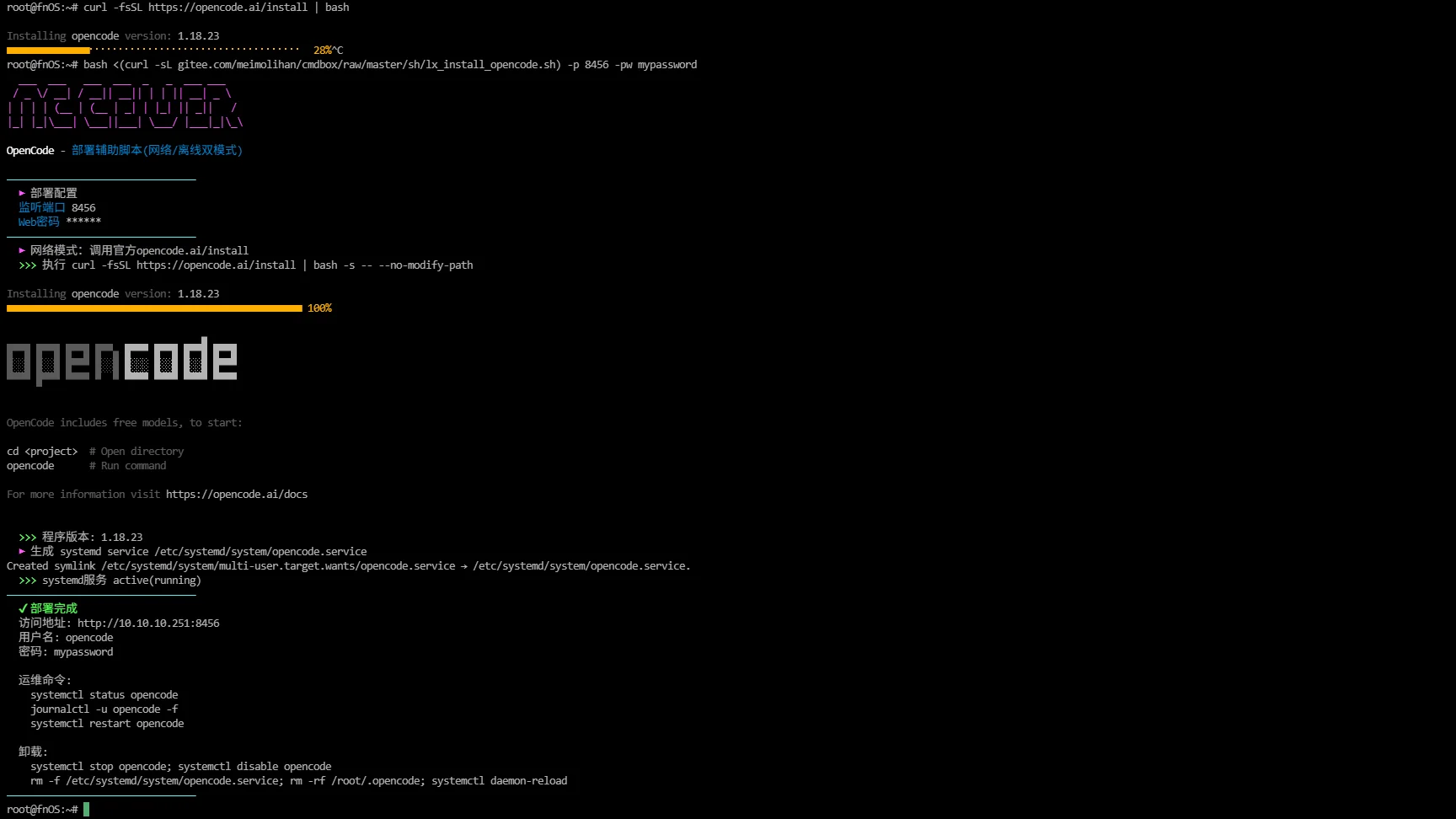
手动安装
OpenCode 官方地址:https://opencode.ai
- 官方一键安装脚本
curl -fsSL https://opencode.ai/install | bash
- 查看版本信息
opencode --version
- 前台启动Web(局域网访问,端口8456,带密码)
export OPENCODE_SERVER_PASSWORD="admin888"
opencode web --hostname 0.0.0.0 --port 8456
--hostname 0.0.0.0:允许局域网其他设备访问;默认 127.0.0.1 仅本机访问
OPENCODE_SERVER_PASSWORD:必须设置,否则Web无密码裸奔,用户名默认 opencode
浏览器访问:http://服务器IP:8456
# 取消密码,前台启动,0.0.0.0局域网访问8456端口
opencode web --hostname 0.0.0.0 --port 8456
没有 export OPENCODE_SERVER_PASSWORD,直接启动即为无密码模式。
补充说明
该脚本封装了 OpenCode 官方一键安装脚本,支持交互式 / 网络 / 离线三种安装方式,可关闭 Web 密码认证,并自动配置 systemd 后台服务,实现开箱即用的安装体验。
功能特点
- 支持交互式 / 网络 / 离线三种安装方式
- 交互式:无参数运行,按提示输入端口、密码、离线二进制路径
- 网络模式:调用 opencode.ai 官方一键安装脚本完成二进制安装
- 离线模式:通过
-b/--binary使用本地上传的二进制,跳过网络下载 - 静默安装:通过
-p、-pw、-b参数指定端口、密码、离线二进制 - 支持
-pw ""关闭 Web 密码认证(仅限可信内网),空密码会在 systemd 服务中移除登录密码 - 自动校验二进制并显示 opencode 版本信息
- 自动配置 systemd 服务实现开机自启和后台运行
- 安装完成后显示访问地址、认证状态/用户名/密码、运维命令、卸载命令等
- 脚本内置彩色输出,界面友好直观
参数说明
| 参数 | 说明 | 默认值 |
|---|---|---|
-p, --port |
Web 监听端口 | 8456 |
-pw, --password |
Web 页面密码;传空字符串 "" 关闭密码认证 |
admin888 |
-b, --binary |
离线模式:本地 opencode 二进制路径,跳过网络下载 | 空(走网络安装) |
-h, --help |
显示帮助信息 | - |
| 无参数 | 进入交互式配置模式 | - |
输出说明
脚本输出包含以下字段:
| 字段 | 说明 |
|---|---|
| 部署配置 | 显示监听端口、密码(或已关闭认证)、离线二进制路径 |
| 安装模式 | 网络模式(官方脚本)或离线模式(本地二进制) |
| 版本信息 | 显示安装的 opencode 版本 |
| systemd 配置 | 生成服务文件并启动服务(空密码时移除密码环境变量) |
| 服务状态 | 显示 systemd 服务运行状态 |
| 安装结果 | 显示访问地址、认证状态/用户名/密码、运维命令、卸载命令 |
注意事项
- 需要 root 权限运行(脚本内强制检测,非 root 直接退出)
- 无参数运行进入交互式配置模式,或用
-p、-pw、-b静默安装 - 网络模式需要能够访问 opencode.ai 官方安装脚本
- 网络安装失败时会提示切换到离线模式
- 离线模式需先将 opencode 二进制上传到服务器,再用
--binary指定路径 - 二进制默认安装路径:
/root/.opencode/bin/opencode - systemd 服务名称:
opencode,服务文件位于/etc/systemd/system/opencode.service - 官方安装使用
--no-modify-path,不会修改PATH环境变量 -pw ""或交互时密码留空会关闭 Web 认证,仅建议在可信内网使用- 默认密码为
admin888,建议生产环境修改 - 脚本以 bash 编写,确保运行环境支持 bash
脚本源码
#!/usr/bin/env bash
# OpenCode deploy helper: official install + systemd service generator
set -euo pipefail

list_color_init() {
    export gl_hui=$'\033[38;5;59m'
    export gl_hong=$'\033[38;5;9m'
    export gl_lv=$'\033[38;5;10m'
    export gl_huang=$'\033[38;5;11m'
    export gl_lan=$'\033[38;5;32m'
    export gl_bai=$'\033[38;5;15m'
    export gl_zi=$'\033[38;5;13m'
    export gl_bufan=$'\033[38;5;14m'
    export reset=$'\033[0m'
}
list_color_init

sep_line() {
  printf '%s' "$gl_bufan"
  printf '—%.0s' {1..32}
  printf '%s\n' "$reset"
}
section(){ printf "  %s %s\n" "${gl_zi}▶${reset}" "$1"; }
ok(){ printf "  %s %s\n" "${gl_lv}>>>${reset}" "$1"; }
warn(){ printf "  %s %s\n" "${gl_huang}[警告]${reset}" "$1"; }
error(){ printf "  %s %s\n" "${gl_hong}[错误]${reset}" "$1" >&2; exit 1; }

print_banner() {
  local z="$gl_zi" r="$reset" b="$gl_bai"
  printf '%s\n' \
    "${z}  ___  ___   ___  ___  _   _  ___ ___${r}" \
    "${z} / _ \\/ __| / __|| __|| | | || __| _ \\${r}" \
    "${z}| | | | (__ | (__ | _| | |_| || _||   /${r}" \
    "${z}|_| |_|\\___| \\___||___| \\___/ |___|_|\\_\\${r}" \
    "" \
    "${b}OpenCode${r} - ${gl_lan}部署辅助脚本(网络/离线双模式)${r}" \
    ""
}

show_usage(){
cat <<EOF
用法:
  $0 [选项]

无参数运行:进入交互式配置模式

选项:
  -p,--port <num>        Web监听端口 (默认8456)
  -pw,--password <str>   Web登录密码;传空字符串""代表关闭密码认证
  -b,--binary <path>     离线模式:指定本地opencode二进制路径,跳过网络下载
  -h,--help              显示帮助

示例:
  # 交互式安装
  $0

  # 网络模式静默安装
  $0 -p 8456 -pw mypass123

  # 静默安装,关闭密码访问(仅可信内网)
  $0 -p 8456 -pw ""

  # 离线模式
  $0 -p 8456 -pw mypass123 --binary /root/opencode
EOF
}

# 默认参数
PORT=8456
PASSWORD="admin888"
BINARY_PATH=""
INTERACTIVE=false

# 判断是否无参数,开启交互
if [[ $# -eq 0 ]];then
    INTERACTIVE=true
fi

# 参数解析
while [[ $# -gt 0 ]]; do
case "$1" in
-p|--port)
    [[ -n "${2:-}" ]] || error "--port 需要端口参数"
    PORT="$2"; shift 2
;;
-pw|--password)
    [[ -n "${2:-}" || "${2:-}" == "" ]] || error "--password 需要参数,空字符串代表关闭密码"
    PASSWORD="$2"; shift 2
;;
-b|--binary)
    [[ -n "${2:-}" ]] || error "--binary 需要本地二进制文件路径"
    BINARY_PATH="$2"; shift 2
;;
-h|--help)
    show_usage
    exit 0
;;
*)
    error "未知参数: $1"
;;
esac
done

# 交互式输入逻辑
if [[ "${INTERACTIVE}" == true ]];then
    print_banner
    sep_line
    section "交互式部署配置"
    read -p "  ${gl_lan}监听端口${reset} [默认${PORT}]: " input_port
    [[ -n "${input_port}" ]] && PORT="${input_port}"

    read -p "  ${gl_lan}Web密码${reset} [默认${PASSWORD},留空直接回车=关闭密码访问]: " input_pw
    if [[ "${input_pw}" == "" ]];then
        warn "密码为空,将关闭Web认证,仅内网可信环境使用!"
        PASSWORD=""
    else
        PASSWORD="${input_pw}"
    fi

    read -p "  ${gl_lan}离线二进制路径${reset} [直接回车=网络下载]: " input_bin
    [[ -n "${input_bin}" ]] && BINARY_PATH="${input_bin}"
    sep_line
fi

[[ "$(id -u)" -ne 0 ]] && error "必须使用root执行"
INSTALL_BIN="/root/.opencode/bin/opencode"
mkdir -p /root/.opencode/bin

# 打印部署配置
print_banner
sep_line
section "部署配置"
printf "  %-18s %s\n" "${gl_lan}监听端口${reset}" "${PORT}"
if [[ "${PASSWORD}" == "" ]];then
    printf "  %-18s %s\n" "${gl_lan}Web密码${reset}" "${gl_huang}[已关闭认证]${reset}"
else
    printf "  %-18s %s\n" "${gl_lan}Web密码${reset}" "******"
fi
[[ -n "${BINARY_PATH}" ]] && printf "  %-18s %s\n" "${gl_lan}离线二进制${reset}" "${BINARY_PATH}"
sep_line

# 安装本体:离线优先,否则调用官方install脚本
if [[ -n "${BINARY_PATH}" ]]; then
    section "离线模式:使用本地二进制"
    [[ -f "${BINARY_PATH}" ]] || error "文件不存在: ${BINARY_PATH}"
    cp -f "${BINARY_PATH}" "${INSTALL_BIN}"
    chmod +x "${INSTALL_BIN}"
else
    section "网络模式:调用官方opencode.ai/install"
    ok "执行 curl -fsSL https://opencode.ai/install | bash -s -- --no-modify-path"
    if ! curl -fsSL https://opencode.ai/install | bash -s -- --no-modify-path; then
        warn "网络安装失败!github/opencode网络不通,请切换离线模式"
        warn "示例:$0 -p ${PORT} -pw ${PASSWORD} --binary /root/opencode"
        error "网络安装终止"
    fi
fi

# 校验二进制
[[ -x "${INSTALL_BIN}" ]] || error "二进制不存在或无执行权限 ${INSTALL_BIN}"
VER_OUT=$(${INSTALL_BIN} --version 2>/dev/null || true)
ok "程序版本: ${VER_OUT}"

section "生成 systemd service /etc/systemd/system/opencode.service"
cat > /etc/systemd/system/opencode.service <<'EOF'
[Unit]
Description=OpenCode Web Service
After=network.target

[Service]
Type=simple
User=root
{{ENV_PASSWORD}}
ExecStart={{BIN}} web --hostname 0.0.0.0 --port {{PORT}}
Restart=always
RestartSec=10
StandardOutput=journal
StandardError=journal

[Install]
WantedBy=multi-user.target
EOF

# 处理密码环境变量:空密码则整行移除,否则填充Environment
if [[ "${PASSWORD}" == "" ]];then
    sed -i "s|{{ENV_PASSWORD}}||g" /etc/systemd/system/opencode.service
else
    sed -i "s|{{ENV_PASSWORD}}|Environment=\"OPENCODE_SERVER_PASSWORD=${PASSWORD}\"|g" /etc/systemd/system/opencode.service
fi
sed -i "s|{{BIN}}|${INSTALL_BIN}|g" /etc/systemd/system/opencode.service
sed -i "s|{{PORT}}|${PORT}|g" /etc/systemd/system/opencode.service

systemctl daemon-reload
systemctl enable --now opencode
sleep 2
if systemctl is-active opencode >/dev/null 2>&1;then
    ok "systemd服务 active(running)"
else
    warn "服务未正常启动,排查命令 journalctl -u opencode -f"
fi

IP=$(hostname -I 2>/dev/null | awk '{print $1}')
[[ -z "${IP}" ]] && IP="<fnOS_IP>"

sep_line
printf "  ${gl_lv}✔ 部署完成${reset}\n"
printf "  访问地址: http://%s:%s\n" "${IP}" "${PORT}"
if [[ "${PASSWORD}" == "" ]];then
    printf "  ${gl_huang}认证状态:已关闭密码访问(内网模式)${reset}\n"
else
    printf "  用户名: opencode\n"
    printf "  密码: %s\n" "${PASSWORD}"
fi
printf "\n"
printf "  运维命令:\n"
printf "    systemctl status opencode\n"
printf "    journalctl -u opencode -f\n"
printf "    systemctl restart opencode\n"
printf "\n"
printf "  卸载:\n"
printf "    systemctl stop opencode; systemctl disable opencode\n"
printf "    rm -f /etc/systemd/system/opencode.service; rm -rf /root/.opencode; systemctl daemon-reload\n"
sep_line
安装后取消密码登录
一键修改命令
# 删除环境变量 OPENCODE_SERVER_PASSWORD=xxx 这一行
sed -i '/OPENCODE_SERVER_PASSWORD/d' /etc/systemd/system/opencode.service

# 重载systemd配置,重启服务
systemctl daemon-reload
systemctl restart opencode

# 查看状态
systemctl status opencode
创建本地脚本
new_script="new_test.sh"

cat > "$new_script" << 'EOF'
#!/bin/bash

# 粘贴脚本源码

EOF

# 保留本地脚本,去掉 rm -f "$new_script"
chmod +x "$new_script" && ./"$new_script" && rm -f "$new_script"
常用运维命令
# 查看服务状态
sudo systemctl status opencode

# 停止服务
sudo systemctl stop opencode

# 重启服务
sudo systemctl restart opencode

# 查看日志(最近100行)
sudo journalctl -u opencode -n 100

# 实时跟踪日志
sudo journalctl -u opencode -f

# 查看开机自启状态
sudo systemctl is-enabled opencode

# 禁用开机自启(如果需要)
sudo systemctl disable opencode