docker_images_find
Docker 镜像列表 美化工具 - 指定镜像
一键脚本
bash <(curl -sL gitee.com/meimolihan/cmdbox/raw/master/sh/docker_images_find.sh) mobufan/random-pic-api:latest
效果预览
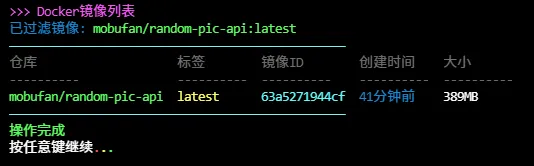
补充说明
该脚本用于美化显示 Docker 镜像列表,支持通过参数过滤指定镜像,基于 docker images 命令和 awk 文本处理实现,适合快速查看和筛选本地镜像。
功能特点
- 支持传参过滤:可指定镜像名称进行精确或模糊匹配
- 不传参则显示全部镜像列表
- 美化输出:使用 ANSI 颜色码区分不同字段(仓库、标签、ID、时间、大小)
- 格式化时间显示:将 Docker 的时间格式转换为中文(年前、个月前、天前、小时前等)
- 镜像 ID 简化:只显示前 12 位字符
- 表格对齐:使用 column 命令自动对齐列(如果可用)
输出说明
脚本输出包含以下字段:
| 字段 | 说明 |
|---|---|
| 仓库 | 镜像的仓库名称(绿色显示) |
| 标签 | 镜像的标签名称(黄色显示) |
| 镜像ID | 镜像 ID 的前 12 位(青色显示) |
| 创建时间 | 镜像创建时间的中文格式(白色显示) |
| 大小 | 镜像占用的磁盘空间(白色显示) |
注意事项
- 脚本需要 Docker 环境可用且 Docker 服务正在运行
- 传参格式:
./脚本.sh 镜像名称,如mobufan/random-pic-api:latest - 过滤功能依赖 docker images 的过滤参数,支持模糊匹配
- 如果系统没有 column 命令,表格可能无法对齐,但不影响功能
- 该脚本只显示镜像列表,不提供任何管理功能
- 适合与其他 Docker 管理脚本配合使用
脚本源码
传参:脚本.sh /镜像名称
不传参:脚本.sh 显示全部镜像
#!/bin/bash
set -uo pipefail

list_color_init() {
    export gl_hui=$'\033[38;5;59m'
    export gl_hong=$'\033[38;5;9m'
    export gl_lv=$'\033[38;5;10m'
    export gl_huang=$'\033[38;5;11m'
    export gl_lan=$'\033[38;5;32m'
    export gl_bai=$'\033[38;5;15m'
    export gl_zi=$'\033[38;5;13m'
    export gl_bufan=$'\033[38;5;14m'
    export reset=$'\033[0m'
}
list_color_init

break_end() {
    echo -e "${gl_lv}操作完成${gl_bai}"
    echo -e "${gl_bai}按任意键继续 ${gl_hong}.${gl_huang}.${gl_lv}.${gl_bai}\c"
    read -r -n 1 -s -p ""
    echo ""
    clear
}

column_if_available() {
    if command -v column &> /dev/null; then
        column -t -s $'\t'
    else
        cat
    fi
}

list_beautify_docker_images() {
    local filter_image="$1"
    {
        printf "%s%s\t%s\t%s\t%s\t%s%s\n" "$gl_hui" "仓库" "标签" "镜像ID" "创建时间" "大小" "$reset"
        printf "%s%s\t%s\t%s\t%s\t%s%s\n" "$gl_hui" "----------" "----------" "----------" "----------" "----------" "$reset"

        if [[ -n "$filter_image" ]]; then
            docker image ls --format "{{.Repository}}\t{{.Tag}}\t{{.ID}}\t{{.CreatedSince}}\t{{.Size}}" "$filter_image"
        else
            docker image ls --format "{{.Repository}}\t{{.Tag}}\t{{.ID}}\t{{.CreatedSince}}\t{{.Size}}"
        fi | \
        awk -v green="$gl_lv" -v yellow="$gl_huang" -v cyan="$gl_bufan" -v blue="$gl_lan" -v white="$gl_bai" -v reset="$reset" '
        BEGIN {FS="\t"; OFS="\t"}
        {
            id = substr($3, 1, 12)
            time = $4
            gsub(/ years ago/, "年前", time)
            gsub(/ year ago/, "年前", time)
            gsub(/ months ago/, "个月前", time)
            gsub(/ month ago/, "个月前", time)
            gsub(/ weeks ago/, "周前", time)
            gsub(/ week ago/, "周前", time)
            gsub(/ days ago/, "天前", time)
            gsub(/ day ago/, "天前", time)
            gsub(/ hours ago/, "小时前", time)
            gsub(/ hour ago/, "小时前", time)
            gsub(/ minutes ago/, "分钟前", time)
            gsub(/ minute ago/, "分钟前", time)
            gsub(/ seconds ago/, "秒前", time)
            gsub(/ second ago/, "秒前", time)
            gsub(/About /, "", time)

            print green $1 reset, yellow $2 reset, cyan id reset, blue time reset, white $5 reset
        }'
    } | column_if_available
}

list_beautify_all() {
    local filter_img=""
    # 安全判断参数,避免未绑定变量错误
    if [[ $# -ge 1 ]]; then
        filter_img="$1"
    fi

    clear
    echo -e "${gl_zi}>>> Docker镜像列表${gl_bai}"
    if [[ -n "$filter_img" ]]; then
        echo -e "${gl_lan}已过滤镜像: ${gl_lv}${filter_img}${gl_bai}"
    fi
    echo -e "${gl_bufan}————————————————————————————————————————————————${gl_bai}"
    list_beautify_docker_images "$filter_img"
    echo -e "${gl_bufan}————————————————————————————————————————————————${gl_bai}"
    break_end
}

# 安全调用
if [[ $# -ge 1 ]]; then
    list_beautify_all "$1"
else
    list_beautify_all
fi
创建本地脚本
new_script="new_test.sh"

cat > "$new_script" << 'EOF'
#!/bin/bash

# 粘贴脚本源码

EOF

# 保留本地脚本,去掉 rm -f "$new_script"
chmod +x "$new_script" && ./"$new_script" && rm -f "$new_script"