linux_setup_ssh
Linux SSH 服务安装配置与安全优化
一键脚本
bash <(curl -sL gitee.com/meimolihan/cmdbox/raw/master/sh/linux_setup_ssh.sh)
效果预览
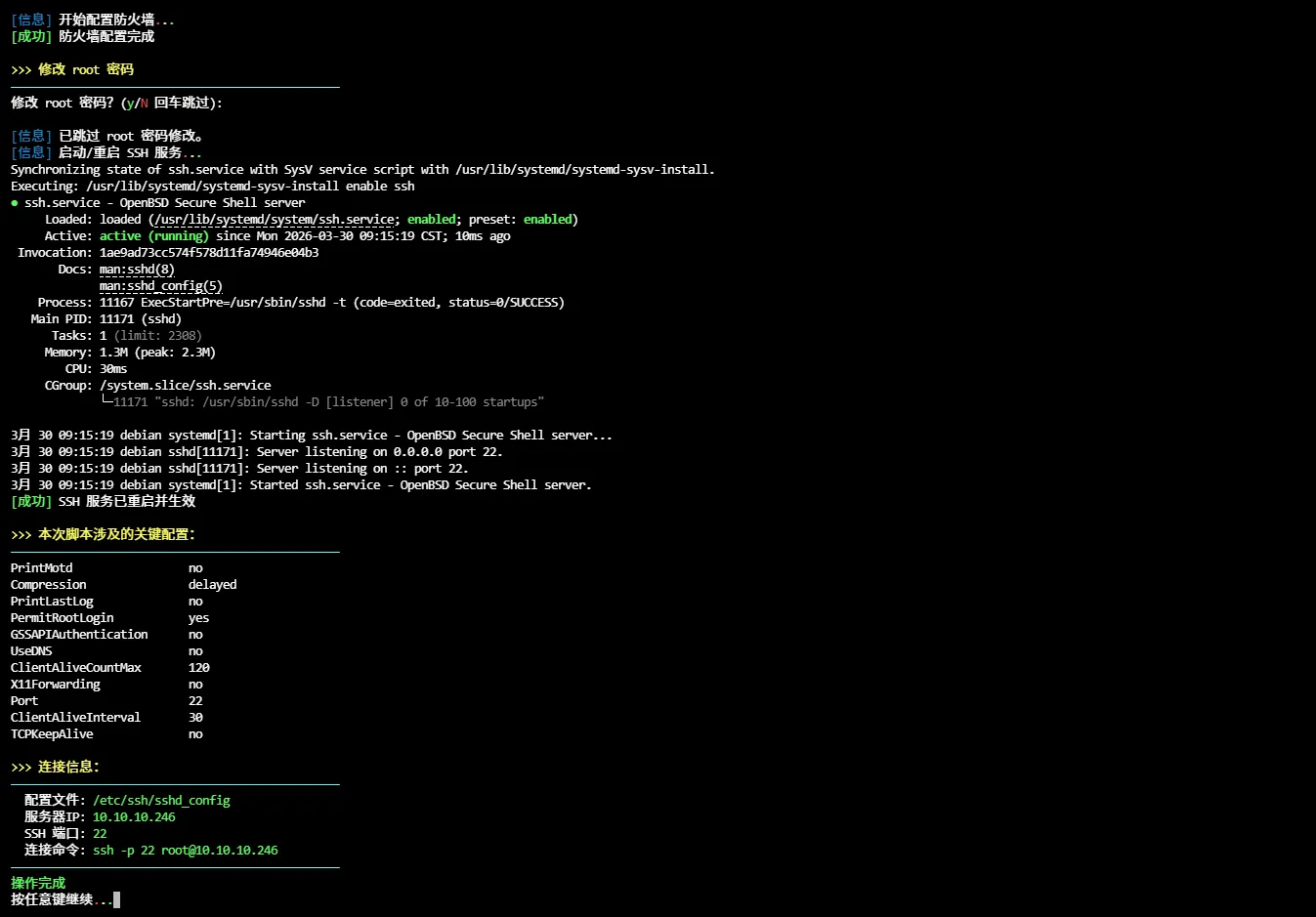
补充说明
linux_setup_ssh 是一键安装、配置并优化 SSH 服务的脚本,自动识别主流 Linux 发行版(Debian/Ubuntu/CentOS/RHEL/Fedora/Rocky/AlmaLinux/openSUSE/Arch/Manjaro)并执行对应操作。
功能概述
| 功能 | 说明 |
|---|---|
| 发行版检测 | 自动识别 10+ 种 Linux 发行版及版本号 |
| SSH 安装 | 使用对应包管理器安装 openssh-server |
| 配置备份 | 自动备份原配置文件(带时间戳) |
| 安全优化 | 禁用 DNS 反向解析、GSSAPI、压缩延迟等 |
| 连接保活 | 配置 ClientAliveInterval/CountMax 防止断连 |
| 防火墙配置 | 自动适配 ufw / firewalld / iptables |
| 密码修改 | 可选交互式修改 root 密码 |
| 配置查看 | 彩色显示当前 SSH 关键配置项 |
兼容发行版
| 发行版 | 包管理器 | 服务名称 |
|---|---|---|
| Debian / Ubuntu / LinuxMint | apt | ssh |
| CentOS / RHEL / Fedora / Rocky / AlmaLinux | dnf/yum | sshd |
| openSUSE / SUSE | zypper | ssh |
| Arch / Manjaro | pacman | ssh |
安全优化项
| 配置项 | 值 | 作用 |
|---|---|---|
| PermitRootLogin | yes | 允许 root 登录 |
| GSSAPIAuthentication | no | 禁用 GSSAPI 认证(加快连接速度) |
| UseDNS | no | 禁用 DNS 反向解析(避免连接延迟) |
| PrintMotd | no | 不显示每日提示信息 |
| PrintLastLog | no | 不显示上次登录信息 |
| TCPKeepAlive | no | 禁用 TCP 保活(依赖应用层心跳) |
| ClientAliveInterval | 30 | 服务端每 30 秒向客户端发心跳 |
| ClientAliveCountMax | 120 | 允许 120 次心跳超时(合计 60 分钟) |
| Compression | delayed | 延迟压缩(密码阶段后启用) |
| X11Forwarding | no | 禁用 X11 转发(减少攻击面) |
安装 SSH 服务
# Debian / Ubuntu
sudo apt-get update && sudo apt-get install openssh-server -y

# CentOS / RHEL / Rocky
sudo dnf install -y openssh-server

# openSUSE
sudo zypper install -y openssh

# Arch / Manjaro
sudo pacman -Syu --noconfirm openssh
启用 SSH 服务
# Debian / Ubuntu / openSUSE / Arch
sudo systemctl enable ssh
sudo systemctl start ssh

# CentOS / RHEL / Fedora
sudo systemctl enable sshd
sudo systemctl start sshd

# 检查服务状态
sudo systemctl status ssh    # Debian 系
sudo systemctl status sshd   # RHEL 系
配置备份与修改
# 备份原始配置
sudo cp /etc/ssh/sshd_config /etc/ssh/sshd_config.backup.$(date +%Y%m%d)

# 修改关键配置(以提升连接稳定性为例)
sudo sed -i \
  -e 's/^#Port 22/Port 22/' \
  -e 's/^#PermitRootLogin.*/PermitRootLogin yes/' \
  -e 's/^#GSSAPIAuthentication.*/GSSAPIAuthentication no/' \
  -e 's/^#UseDNS.*/UseDNS no/' \
  -e 's/^#ClientAliveInterval.*/ClientAliveInterval 30/' \
  -e 's/^#ClientAliveCountMax.*/ClientAliveCountMax 120/' \
  /etc/ssh/sshd_config

# 验证配置语法
sudo sshd -t

# 重启生效
sudo systemctl restart ssh
防火墙放行
# ufw(Debian/Ubuntu)
sudo ufw allow 22/tcp
sudo ufw enable

# firewalld(CentOS/RHEL/Fedora)
sudo firewall-cmd --permanent --add-port=22/tcp
sudo firewall-cmd --reload

# iptables(通用)
sudo iptables -A INPUT -p tcp --dport 22 -j ACCEPT
客户端连接
# 默认端口连接
ssh root@<服务器IP>

# 指定端口连接
ssh -p 22 root@<服务器IP>

# 查看服务器 IP
hostname -I | awk '{print $1}'
安全加固建议
# 1. 更改默认端口(减少扫描攻击)
#    编辑 /etc/ssh/sshd_config,将 Port 22 改为其他端口(如 2222)
#    修改后需对应更新防火墙规则

# 2. 限制登录用户
echo "AllowUsers admin user1 user2" >> /etc/ssh/sshd_config

# 3. 限制最大认证尝试次数
echo "MaxAuthTries 3" >> /etc/ssh/sshd_config

# 4. 禁用密码认证(仅允许密钥)
echo "PasswordAuthentication no" >> /etc/ssh/sshd_config
echo "PubkeyAuthentication yes" >> /etc/ssh/sshd_config

# 5. 生成密钥对(客户端执行)
ssh-keygen -t ed25519

# 6. 复制公钥到服务器
ssh-copy-id -p 22 user@server_ip
日志与监控
# 查看 SSH 服务日志
sudo journalctl -u ssh -f
sudo journalctl -u sshd -f

# 查看登录记录
last

# 查看失败登录尝试
sudo grep "Failed password" /var/log/auth.log     # Debian 系
sudo grep "Failed password" /var/log/secure       # RHEL 系

# SSH 配置语法检查
sudo sshd -t
故障排查
# 检查服务是否运行
sudo systemctl status ssh

# 检查端口监听状态
sudo netstat -tulnp | grep :22
sudo ss -tulnp | grep :22

# 检查防火墙规则
sudo ufw status
sudo firewall-cmd --list-all
sudo iptables -L INPUT -n | grep :22

# 详细调试连接
ssh -vvv user@server_ip
脚本源码
#!/bin/bash
set -eo pipefail

gl_hui='\033[38;5;59m'
gl_hong='\033[38;5;9m'
gl_lv='\033[38;5;10m'
gl_huang='\033[38;5;11m'
gl_lan='\033[38;5;32m'
gl_bai='\033[38;5;15m'
gl_zi='\033[38;5;13m'
gl_bufan='\033[38;5;14m'

log_info() { echo -e "${gl_lan}[信息]${gl_bai} $*"; }
log_ok() { echo -e "${gl_lv}[成功]${gl_bai} $*"; }
log_warn() { echo -e "${gl_huang}[警告]${gl_bai} $*"; }
log_error() { echo -e "${gl_hong}[错误]${gl_bai} $*" >&2; }

break_end() {
    echo -e "${gl_lv}操作完成${gl_bai}"
    echo -e "${gl_bai}按任意键继续 ${gl_hong}.${gl_huang}.${gl_lv}.${gl_bai}\c"
    read -r -n 1 -s -p ""
    echo ""
    clear
}

column_if_available() {
    if command -v column &> /dev/null; then
        column -t -s $'\t'
    else
        cat
    fi
}

sleep_fractional() {
    local seconds=$1
    if sleep "$seconds" 2>/dev/null; then return 0; fi
    if command -v perl >/dev/null 2>&1; then perl -e "select(undef, undef, undef, $seconds)"; return 0; fi
    if command -v python3 >/dev/null 2>&1; then python3 -c "import time; time.sleep($seconds)"; return 0; fi
    if command -v python >/dev/null 2>&1; then python -c "import time; time.sleep($seconds)"; return 0; fi
    local int_seconds=$(echo "$seconds" | awk '{print int($1+0.999)}')
    sleep "$int_seconds"
}

cancel_return() {
    local menu_name="${1:-上一级选单}"
    echo -ne "${gl_lv}即将 ${gl_huang}${menu_name} ${gl_hong}.${gl_huang}.${gl_lv}.${gl_bai}\c"
    sleep_fractional 0.5
    echo -ne "${gl_hong}.${gl_huang}.${gl_lv}.${gl_bai}\c"
    sleep_fractional 0.6
    echo ""
    clear
}

root_use() {
    clear
    if [ "$EUID" -ne 0 ]; then
        echo -e "\n${gl_zi}>>> ROOT登录检查 ${gl_hong}.${gl_huang}.${gl_lv}.${gl_bai}"
        echo -e "${gl_bufan}————————————————————————————————————————————————${gl_bai}"
        echo -e "${gl_huang}提示: ${gl_bai}该功能需要root用户才能运行!"
        echo -e "${gl_bufan}————————————————————————————————————————————————${gl_bai}"
        break_end
        mobufan
        return 1
    fi
    return 0
}

list_beautify_sshd_config() {
    {
        grep -vE '^#|^$' /etc/ssh/sshd_config | awk -v gray="$gl_hui" -v green="$gl_lv" \
            -v yellow="$gl_huang" -v blue="$gl_lan" -v purple="$gl_zi" -v reset="$reset" '
        BEGIN {
            info["Port"] = "SSH服务端口"
            info["ListenAddress"] = "监听IP地址"
            info["Protocol"] = "SSH协议版本"
            info["HostKey"] = "主机密钥文件路径"
            info["PermitRootLogin"] = "是否允许root登录"
            info["PasswordAuthentication"] = "是否开启密码认证"
            info["PubkeyAuthentication"] = "是否开启公钥认证"
            info["AuthorizedKeysFile"] = "公钥授权文件位置"
            info["Subsystem"] = "系统子服务(一般为SFTP)"
            info["UsePAM"] = "是否启用PAM认证"
            info["X11Forwarding"] = "是否开启图形界面转发"
            info["PrintMotd"] = "登录是否显示提示信息"
            info["ClientAliveInterval"] = "客户端心跳检测间隔(秒)"
            info["ClientAliveCountMax"] = "客户端最大心跳超时次数"
            info["AllowUsers"] = "允许登录的用户列表"
            info["DenyUsers"] = "禁止登录的用户列表"
            info["AllowGroups"] = "允许登录的用户组"
            info["DenyGroups"] = "禁止登录的用户组"
            info["ChallengeResponseAuthentication"] = "挑战响应式认证"
            info["GSSAPIAuthentication"] = "GSSAPI统一认证"
            info["KerberosAuthentication"] = "Kerberos票据认证"
            info["LogLevel"] = "日志记录级别"
            info["MaxAuthTries"] = "最大密码错误次数"
            info["MaxSessions"] = "最大同时连接会话数"
            info["TCPKeepAlive"] = "是否开启TCP连接保活"
            info["PermitEmptyPasswords"] = "是否允许空密码登录"
            info["StrictModes"] = "是否开启权限严格检查"
            info["AcceptEnv"] = "允许接收的客户端环境变量"
            info["Ciphers"] = "SSH加密算法套件"
            info["MACs"] = "消息校验算法"
            info["KexAlgorithms"] = "密钥交换算法"
            info["Match"] = "条件匹配规则配置"

            print gray "配置项名称\t参数值\t中文说明" reset
            print gray "----------\t--------\t-------------------------" reset
        }
        {
            key = $1
            val = substr($0, index($0, $2))
            gsub(/^[ \t]+|[ \t]+$/, "", val)

            if (key == "Port" || key == "ListenAddress") color = purple
            else color = green

            desc = (key in info) ? info[key] : "其他SSH配置项"

            print color key "\t" yellow val "\t" blue desc reset
        }' | column_if_available
    }
}

linux_setup_ssh() {
    clear
    root_use

    echo -e "${gl_zi}>>> 配置 SSH 服务${gl_bai}"
    echo -e "${gl_bufan}————————————————————————————————————————————————${gl_bai}"
    list_beautify_sshd_config
    echo -e "${gl_bufan}————————————————————————————————————————————————${gl_bai}"
    echo ""
    echo -e "${gl_huang}>>> 配置 SSH 端口${gl_bai}"
    echo -e "${gl_bufan}————————————————————————————————————————————————${gl_bai}"
    local port_input
    while true; do
        read -r -e -p "$(echo -e "${gl_bai}请输入 SSH 端口 (回车默认 ${gl_huang}22${gl_bai}, ${gl_huang}0${gl_bai}退出脚本): ")" port_input
        [ -z "$port_input" ] && { SSH_PORT=22; break; }
        [ "$port_input" = "0" ] && { cancel_return "退出脚本"; return 1; }

        if [[ "$port_input" =~ ^[1-9][0-9]{0,4}$ ]] && (( port_input <= 65535 )); then
            SSH_PORT=$port_input
            break
        else
            log_error "端口格式非法,请重新输入!"
        fi
    done
    log_info "使用 SSH 端口: $SSH_PORT"

    log_info "检测操作系统 ${gl_hong}.${gl_huang}.${gl_lv}.${gl_bai}"
    if [ -f /etc/os-release ]; then
        . /etc/os-release
        OS=$ID
        OS_VERSION=$VERSION_ID
        OS_NAME=$PRETTY_NAME
    elif type lsb_release >/dev/null 2>&1; then
        OS=$(lsb_release -si | tr '[:upper:]' '[:lower:]')
        OS_VERSION=$(lsb_release -sr)
        OS_NAME=$(lsb_release -sd)
    elif [ -f /etc/lsb-release ]; then
        . /etc/lsb-release
        OS=$DISTRIB_ID
        OS_VERSION=$DISTRIB_RELEASE
        OS_NAME=$DISTRIB_DESCRIPTION
    elif [ -f /etc/debian_version ]; then
        OS=debian
        OS_VERSION=$(cat /etc/debian_version)
        OS_NAME="Debian $OS_VERSION"
    elif [ -f /etc/redhat-release ]; then
        OS=$(awk '{print tolower($1)}' /etc/redhat-release)
        OS_VERSION=$(awk '{print $3}' /etc/redhat-release)
        OS_NAME=$(cat /etc/redhat-release)
    else
        log_error "无法检测操作系统"; exit 1
    fi
    log_info "检测到操作系统: $OS_NAME"

    log_info "开始安装 SSH 服务 ${gl_hong}.${gl_huang}.${gl_lv}.${gl_bai}"
    case $OS in
        debian|ubuntu|linuxmint)
            apt-get update -qq
            apt-get install -y openssh-server
            ;;
        centos|rhel|fedora|rocky|almalinux)
            if command -v dnf >/dev/null 2>&1; then
                dnf install -y openssh-server
            else
                yum install -y openssh-server
            fi
            ;;
        opensuse*|suse*)
            zypper install -y openssh
            ;;
        arch|manjaro)
            pacman -Syu --noconfirm openssh
            ;;
        *)
            log_error "不支持的发行版: $OS"; exit 1
            ;;
    esac
    log_ok "SSH 服务安装完成"

    log_info "开始配置 SSH 服务 ${gl_hong}.${gl_huang}.${gl_lv}.${gl_bai}"
    [ -f /etc/ssh/sshd_config ] && \
        cp /etc/ssh/sshd_config /etc/ssh/sshd_config.backup.$(date +%Y%m%d%H%M%S)

    declare -A SSH_DEF
    SSH_DEF=(
        ["Port"]="$SSH_PORT"
        ["PermitRootLogin"]="yes"
        ["GSSAPIAuthentication"]="no"
        ["PrintMotd"]="no"
        ["PrintLastLog"]="no"
        ["TCPKeepAlive"]="no"
        ["Compression"]="delayed"
        ["ClientAliveInterval"]="30"
        ["ClientAliveCountMax"]="120"
        ["UseDNS"]="no"
        ["X11Forwarding"]="no"
    )

    cp /etc/ssh/sshd_config "/etc/ssh/sshd_config.bak.$(date +%Y%m%d_%H%M%S)"

    sed -i '/^[[:space:]]*$/d' /etc/ssh/sshd_config

    sed -i '/^[[:space:]]*#/d' /etc/ssh/sshd_config

    for key in "${!SSH_DEF[@]}"; do
        sed -i "/^[[:space:]]*#*[[:space:]]*$key[[:space:]]/d" /etc/ssh/sshd_config
    done

    sed -i "/[[:space:]]*自动补写缺省值/d" /etc/ssh/sshd_config

    echo "" >> /etc/ssh/sshd_config
    echo "# ==== 自动补写缺省值 $(date +%F' '%T) ====" >> /etc/ssh/sshd_config
    for key in "${!SSH_DEF[@]}"; do
        printf "%-25s %s\n" "$key" "${SSH_DEF[$key]}" >> /etc/ssh/sshd_config
    done

    log_ok "SSH 配置已更新/补全"

    log_info "开始配置防火墙 ${gl_hong}.${gl_huang}.${gl_lv}.${gl_bai}"
    if command -v ufw >/dev/null 2>&1; then
        ufw allow "$SSH_PORT"/tcp
        echo "y" | ufw enable
    elif command -v firewall-cmd >/dev/null 2>&1; then
        systemctl enable --now firewalld
        firewall-cmd --permanent --add-port="$SSH_PORT"/tcp
        firewall-cmd --reload
    elif command -v iptables >/dev/null 2>&1; then
        iptables -A INPUT -p tcp --dport "$SSH_PORT" -j ACCEPT
        mkdir -p /etc/iptables
        iptables-save > /etc/iptables/rules.v4
    else
        log_warn "未找到支持的防火墙工具,请手动配置"
    fi
    log_ok "防火墙配置完成"

    echo ""
    echo -e "${gl_huang}>>> 修改 root 密码${gl_bai}"
    echo -e "${gl_bufan}————————————————————————————————————————————————${gl_bai}"
    read -r -e -p "$(echo -e "${gl_bai}修改 root 密码?(${gl_lv}y${gl_bai}/${gl_hong}N${gl_bai} 回车跳过): ")" -re ans
    echo -e "${gl_bai}"
    case "${ans,,}" in
        y|yes)
            while true; do
                read -s -p "请输入新密码: " -re pw1; echo
                read -s -p "请再次输入新密码: " -re pw2; echo
                if [ "$pw1" = "$pw2" ]; then
                    echo "root:$pw1" | chpasswd 2>/dev/null && {
                        log_ok "root 密码已更新。"; break
                    } || log_warn "密码设置失败(可能过于简单),请重试。"
                else
                    log_warn "两次输入不一致,请重新输入!"
                fi
            done
            ;;
        *) log_info "已跳过 root 密码修改。" ;;
    esac

    log_info "启动/重启 SSH 服务 ${gl_hong}.${gl_huang}.${gl_lv}.${gl_bai}"
    case $OS in
        debian|ubuntu|linuxmint|opensuse*|suse*|arch|manjaro)
            systemctl enable ssh
            systemctl restart ssh
            systemctl status ssh --no-pager -l
            ;;
        centos|rhel|fedora|rocky|almalinux)
            systemctl enable sshd
            systemctl restart sshd
            systemctl status sshd --no-pager -l
            ;;
        *)
            log_error "不支持的发行版: $OS"; exit 1
            ;;
    esac
    log_ok "SSH 服务已重启并生效"

    echo ""
    echo -e "${gl_huang}>>> 本次脚本涉及的关键配置:"
    echo -e "${gl_bufan}————————————————————————————————————————————————${gl_bai}"
    grep -E '^(Port|PermitRootLogin|GSSAPIAuthentication|UseDNS|Compression|ClientAliveInterval|ClientAliveCountMax|TCPKeepAlive|PrintMotd|PrintLastLog|X11Forwarding)[[:space:]]' /etc/ssh/sshd_config

    local ip=$(hostname -I | awk '{print $1}')
    echo ""
    echo -e "${gl_huang}>>> 连接信息:"
    echo -e "${gl_bufan}————————————————————————————————————————————————${gl_bai}"
    echo -e "  配置文件: ${gl_lv}/etc/ssh/sshd_config${gl_bai}"
    echo -e "  服务器IP: ${gl_lv}$ip${gl_bai}"
    echo -e "  SSH 端口: ${gl_lv}$SSH_PORT${gl_bai}"
    echo -e "  连接命令: ${gl_lv}ssh -p $SSH_PORT root@$ip${gl_bai}"
    echo -e "${gl_bufan}————————————————————————————————————————————————${gl_bai}"
    break_end
}

linux_setup_ssh
创建本地脚本
new_script="new_test.sh"

cat > "$new_script" << 'EOF'
#!/bin/bash

# 粘贴脚本源码

EOF

# 保留本地脚本,去掉 rm -f "$new_script"
chmod +x "$new_script" && ./"$new_script" && rm -f "$new_script"